


AMC Theatres: Movies & More
4.763.33K Reviews
App Specs
- Version
- 7.0.139
- Updated On
- License
- Free
- Downloads
- 5,000,000+
- Developer
- AMC Theatres
- Categories
- Entertainment
- Platform
- Android
Screenshots
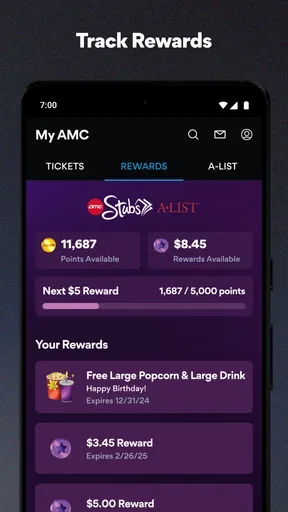
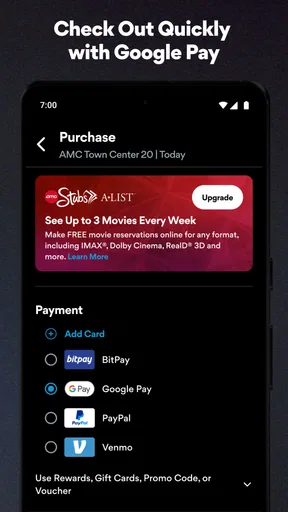
 Analysis by AppCompare
If you're a movie buff like me, you're probably always on the hunt for the next best app to enhance your cinema experience. Well, let me introduce you to the AMC Theatres: Movies & More app. This app is like having a personal movie concierge right in your pocket, and I’ve taken it for a spin to see if it lives up to the hype.
A theater-first tool, not a general movie guide
My overall take is that this entertainment app works best when your goal is to see a film at an AMC location: it brings the practical parts of choosing a session and arranging a visit together. It is less compelling if you mainly want a broad movie database or need to compare every cinema chain in town. That distinction matters. The app’s usefulness depends not only on how often you go to the movies, but also on whether AMC is a realistic option where you live.
AMC Theatres is the developer, and the app is free to install. Its 4.8 average across around 301,000 ratings suggests many users find it useful, though a strong score cannot tell you whether a particular theater has the film, format, or time you want. The app has more than 5 million installs and a Teen age rating. Those details make it a familiar, established option, but I would still judge it by how well it fits your own movie-going habits rather than by popularity alone.
When the planning flow earns its place
The most useful way to approach the app is to start with the decision you have already made. If you know the film, look for a convenient session; if you know the theater, browse what is playing there. That small choice can make the search feel more direct than opening a general entertainment app and working through films, cinema chains, and ticket options separately. The value is practical rather than mysterious: fewer steps between deciding to go and having a plan.
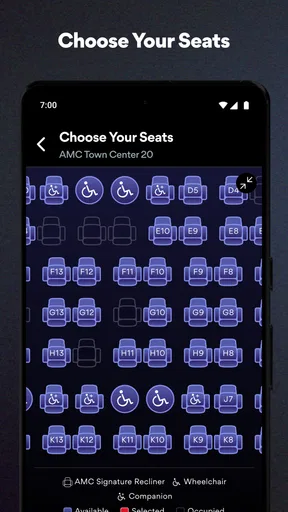
For a weeknight outing, I would check showtimes before messaging friends, then use the available seating view to see whether a group can sit together. If the seats that work for everyone are gone, you can reconsider the time before making the rest of the plan around it. That is a useful habit with any reserved-seat booking: settle the time and seating first, then coordinate dinner, rides, or a meeting point. It reduces the awkward last-minute discovery that the only available seats split the group.
The same approach helps when you are choosing between a standard screening and a premium format. Rather than assuming the most impressive-sounding option is automatically best, I would compare the actual sessions and decide whether the film and occasion justify it. A visually ambitious movie may make a premium presentation appealing; for a casual visit or a title you are less invested in, a convenient time may matter more. The app’s filters can narrow the choice, but they cannot decide which trade-off is worthwhile for you.
Making rewards and extras useful
If you are already a Stubs member, keeping account activity and ticket planning in one place may be the strongest everyday reason to use the app. Rewards are most valuable when you remember to check them before a purchase, not after you have already paid. I would make a quick account check part of the booking routine: confirm that you are signed in, review any reward you intend to use, and then continue to the ticket choice. That simple sequence helps avoid treating membership as an afterthought.
Worth Reading Before You Choose

EA SPORTS FC Mobile 26 Is a Bigger Football Game, but It Takes Time

Flipboard Shows What News Apps Must Do Beyond the Feed

Switching to Android Auto Means Rethinking Your Driving Routine

Google Calendar Makes a Crowded Week Easier to Manage

Ludo King Makes the Most of the Minutes Between Plans

Baby Panda World Brings Quick Play to Modern Phones, but Its Game Library Feels Busy
Trailers and release information serve a different purpose. They are handy when the group has not agreed on a film, but they can also turn a quick booking into a long browsing session. I find it useful to decide whether I am in “choose a movie” mode or “buy tickets” mode before opening those extras. If the start time is close, go straight to the screening search; if the outing is still days away, browsing previews can help everyone settle on a title without switching between several apps.
Special screenings and events can make a return visit feel different from an ordinary trip, especially when you already have a reason to follow a particular film or series. I would check the event information when planning rather than assume that a regular showtime search tells the whole story. The trade-off is that these listings only help if their timing and location suit you; an interesting event at an inconvenient theater is still an inconvenient plan.
Getting Started with AMC Theatres: Movies & More
First things first, downloading the app is a breeze. Available on both Android and iOS, you can easily find it in your app store of choice. Once installed, the user interface is clean and intuitive. The design is sleek, with a dark theme that feels just right for a movie app. Logging in is straightforward, especially if you already have an AMC Stubs account.
Features that Shine
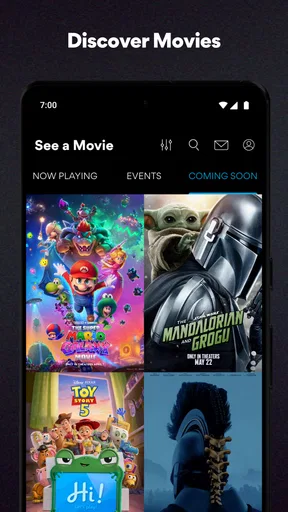
The AMC Theatres: Movies & More app is packed with features that make planning your movie night effortless. One of the standout features is the ability to purchase tickets directly through the app. You can browse showtimes by location or film, making it super easy to find exactly what you're looking for.
But it doesn’t stop there. The app also allows you to select your seats—perfect for ensuring you and your friends get the best spot in the house. If you're a fan of IMAX or Dolby Cinema, you can filter showtimes to find these options as well.
AMC Stubs Integration
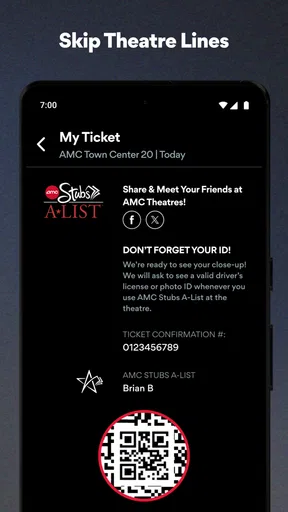
If you’re an AMC Stubs member, this app is a game-changer. You can manage your account, track your rewards, and even redeem them all within the app. It’s seamless and makes being a member feel even more rewarding. Plus, you get access to exclusive promotions and discounts, which never hurts!
Exploring the Extras
Beyond the basics, the app offers a plethora of extras. There's a section for movie trailers, which is perfect if you’re indecisive like me and need a little preview before making your selection. Additionally, you can check out detailed information about upcoming releases. It’s like having a mini IMDb right at your fingertips.
Another cool feature is the app’s ability to alert you about special events and limited-time screenings. If there's a cult classic coming back to the big screen or a special Q&A session with filmmakers, you'll be the first to know.
Choosing it over other ways to book
Compared with a general movie-information app, this one is more useful once you have settled on an AMC theater. A broad guide can be better for comparing titles or venues across different chains, while AMC’s own app keeps the booking path centered on its screenings, seats, and member account. If you routinely choose whichever cinema is closest or cheapest, a cross-chain comparison may deserve the first look. If you usually go to AMC, opening this app directly can save the extra search.
It also differs from simply turning up and buying at the theater. Booking ahead gives you a chance to inspect the session and seating before you leave, which is especially useful for a popular screening or a group that wants to sit together. In exchange, you are making the choice earlier and committing to a particular showtime. For a spontaneous visit where flexibility matters more than seat choice, buying in person may feel simpler; for a planned night, the app’s advance view is the more useful tool.
Small decisions that prevent booking friction
One practical tip is to check the location before comparing times. A film may appear attractive at a distant theater, but travel can erase the convenience of a good start time. I would choose the branch first, then compare sessions and formats there. When more than one location is equally reachable, compare the complete outing—start time, seating, and the kind of presentation—rather than sorting by showtime alone.
For a group, agree on a time window before opening the seat map. Otherwise, everyone may debate several screenings while the available seats change, and the booking process becomes the discussion itself. A smoother workflow is to settle the film, name two acceptable start times, check which one keeps the group together, and then confirm the plan. The app helps with the practical check, but it cannot replace a quick conversation about what everyone is willing to compromise on.
If you are undecided about a title, use the trailer as a tie-breaker rather than a full review substitute. A preview can show tone and visual style, but it will not answer whether the film matches your taste from beginning to end. I would use the app’s movie information to shortlist choices, then make the final call based on the group’s mood and the time available. That keeps the extras helpful without letting browsing take over the evening.
User Experience
Using the AMC Theatres: Movies & More app is a smooth experience. The navigation is intuitive, and the load times are quick. The app feels stable, and I didn’t encounter any crashes or bugs during my testing. It’s clear that a lot of thought went into making this app user-friendly and efficient.
One thing to note, though, is that some features require location services to be enabled. While this is common for apps like this, it’s something to keep in mind if you’re particular about privacy settings.
Where the fit is less convincing
The clearest limitation is its theater focus. If AMC is not near you, or you prefer to compare several cinema chains before choosing, a broader booking service is likely the better starting point. The app’s convenience is tied to its own venues, so it should not be mistaken for a complete map of every local screening option. That is not a flaw for a regular AMC customer, but it is a real boundary for someone who shops around each time.
There is also a difference between convenience and certainty. A clean booking path cannot guarantee that the session suits everyone, that the seats are the ones each person would have picked, or that an event fits the group’s schedule. I recommend checking the theater and time carefully before completing a purchase, especially when coordinating several people. If you are protective of location privacy, consider whether you want to enable location access; searching by a chosen location is a more deliberate alternative when available, though it may take an extra step.
The membership tools are most relevant to people who actually use Stubs. If you rarely visit AMC, rewards and account management add less value, and the app may become one more icon kept for an occasional booking. Likewise, a viewer who mostly streams at home has little reason to install a theater-booking app until a particular outing comes up. It is fine to use it selectively rather than treating it as an essential daily entertainment app.
Who I’d recommend it to
I would recommend this app to people who regularly attend AMC screenings, especially those who like choosing seats ahead of time, plan outings with friends, or already use Stubs. It is also a sensible choice for someone who wants to check whether a particular film is playing nearby before making a bigger plan. Because it is free, trying it for a planned visit is a low-commitment way to see whether its theater-focused workflow suits you.
I would point occasional moviegoers toward whichever option best matches the outing. If the theater is already decided, this app can handle the AMC part without much fuss. If the venue is still up for debate, compare alternatives first. And if you prefer not to install an app for a one-off visit, you can keep your planning simple and use another booking route. The right choice depends on whether you value reserved-seat planning and AMC account access enough to make this a regular stop.
AMC Theatres first appeared on March 20, 2012, and version 7.0.134 supports devices running Android 8.0 or later. The long history and current version point to an app that has continued to evolve, but I would still check compatibility on your own device before relying on it for a time-sensitive booking. A 4.8 average is reassuring as a broad signal, not a promise that every individual visit or theater interaction will be flawless.
Final Thoughts
All in all, the AMC Theatres: Movies & More app is a must-have for any moviegoer. It combines convenience, functionality, and a touch of luxury with its Stubs integration. Whether you're planning a solo movie night or coordinating with friends, this app has you covered. From purchasing tickets to snagging the best seats and scoring rewards, it’s like having your own movie night assistant.
So, if you haven’t already, give the app a download and take your cinema experience to the next level. Trust me, once you start using it, you’ll wonder how you ever planned a movie night without it!
My verdict
I would put it on my phone if AMC is the theater I tend to choose, not because every movie fan needs another app. Its strongest case is the connection between screening search, seat selection, ticket purchase, and Stubs in one place. That is a genuinely useful combination when I already know where I want to go and want to make the details fit a real evening.
For someone who values broad venue comparisons, visits cinemas only rarely, or prefers not to use a location-aware theater app, the advantage is smaller. I would start with a cross-chain option in those cases and return here once AMC is the chosen destination. For regular AMC visitors, though, the balance is favorable: it makes a specific kind of movie night easier to arrange, while leaving the final choice of film, format, and theater in your hands.
Pros
- User-friendly interface for easy navigation.
- Comprehensive movie details and trailers.
- Convenient online ticket purchasing.
- Personalized movie recommendations.
- Exclusive member discounts and offers.
Cons
- Occasional app crashes and bugs.
- Limited payment options available.
- Requires strong internet connection.
- Some features locked for non-members.
- Notifications can be overly frequent.
FAQs for AMC Theatres: Movies & More
What features does the AMC Theatres app offer?
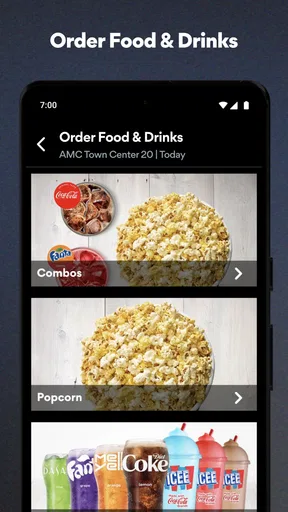
The AMC Theatres app provides a wide range of features designed to enhance your movie-going experience. Users can browse showtimes, purchase tickets, and even select their preferred seats directly from the app. Additionally, the app offers exclusive content such as trailers and behind-the-scenes features, as well as special promotions for AMC Stubs members.
Is the AMC Theatres app free to download and use?
Yes, the AMC Theatres app is free to download on both Android and iOS devices. While downloading and using the app does not incur any costs, purchasing movie tickets and concessions through the app will require payment. Additionally, some features, like AMC Stubs membership benefits, may involve subscription fees.
How does the AMC Stubs program integrate with the app?
The AMC Stubs program is seamlessly integrated into the app, allowing members to easily track points, rewards, and benefits. Users can view their membership status, access exclusive member pricing, and redeem rewards directly through the app. This integration makes it easy for members to maximize their benefits with every purchase.
Can I use the AMC Theatres app to access digital movie tickets?
Yes, the AMC Theatres app provides a convenient way to access digital movie tickets. After purchasing tickets through the app, users can simply show the digital ticket on their smartphone at the theater entrance. This feature eliminates the need for physical tickets and streamlines the check-in process.
What should I do if I encounter issues using the AMC Theatres app?
If you experience any issues with the AMC Theatres app, there are several steps you can take. First, ensure that your app is updated to the latest version. If problems persist, try restarting your device or reinstalling the app. For further assistance, the app provides support options, including a help center and customer service contact information.


